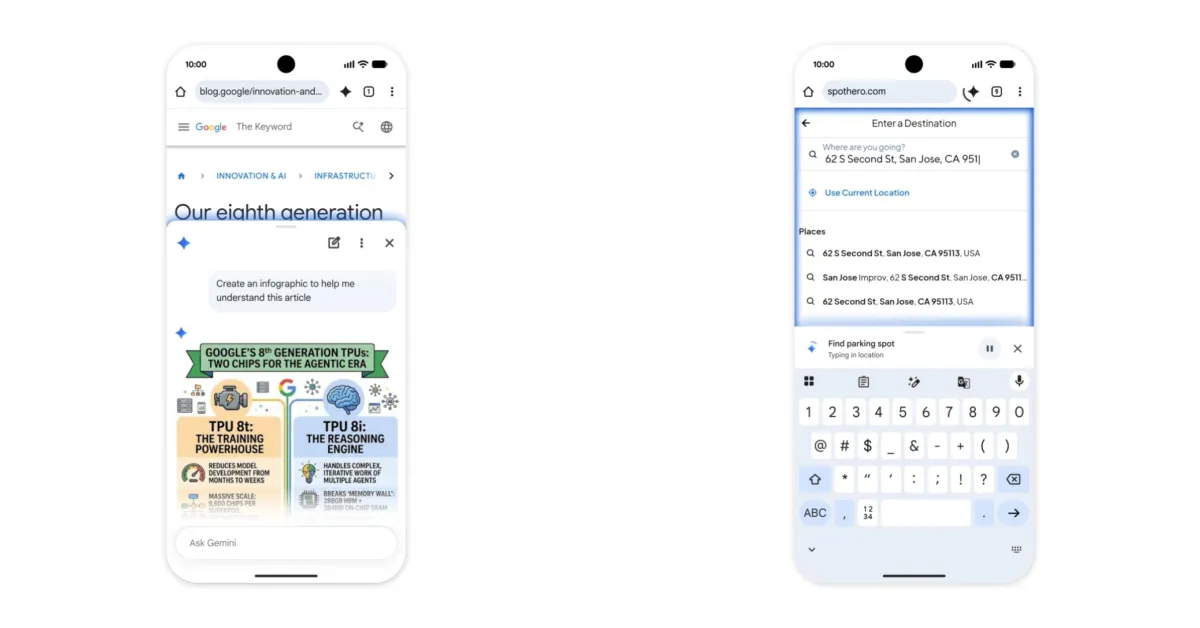
Google has officially expanded the reach of its generative AI ecosystem by completing the rollout of Gemini within the Chrome browser for Android users in the United States. Following an initial preview phase that began in May, this integration marks a significant step in making sophisticated artificial intelligence a native component of the mobile web browsing experience.
What happened
The update introduces a new, accessible interface for Gemini directly within the mobile browser. Users can find the AI assistant via a dedicated “spark” icon located in the toolbar to the right of the address bar. For those who prefer a cleaner toolbar, the feature is also accessible through the three-dot overflow menu. When activated, a sliding panel emerges from the bottom of the screen, providing a user interface that closely resembles the desktop version of Gemini.
This integration is designed to be context-aware. Gemini can ingest the data from the current webpage to provide instant summaries or answer specific questions about the content being viewed. Users have the option to keep this panel docked at the bottom of the screen while they continue to browse. Furthermore, the update includes Nano Banana integration, which provides users with the ability to perform image editing tasks directly.
For users subscribed to the Google AI Pro and Ultra tiers, the update introduces a powerful “auto browse” capability. This feature is designed to function agentically, meaning it can take over repetitive or complex logistical tasks. Examples of these capabilities include organizing travel itineraries, managing recurring online orders, or booking parking for specific events. To ensure security, Google has implemented a requirement for explicit user confirmation before the AI completes any sensitive tasks, such as financial transactions.
Context
This rollout is part of a broader trend where major technology companies are moving beyond standalone chatbots and toward integrated AI agents. By placing Gemini inside Chrome, Google is leveraging its most dominant platform to ensure that AI assistance is always one tap away. This move follows the successful implementation of similar features on the desktop version of Chrome, where AI-powered tab organization and theme generation have already been introduced.
Control remains a central theme in this release. Google has included several toggles within the settings menu that allow users to customize their experience. For instance, the “Personal Intelligence” feature can be enabled or disabled to control whether Gemini has access to data from other Google services like Keep or Calendar. Similarly, the ability for the AI to read the current page’s context can be toggled off for those who prioritize privacy over immediate functionality.
Why it matters
The transition of Gemini from a separate app or website into the primary interface of the browser represents a fundamental shift in how we interact with the mobile web. Instead of the browser being a passive window for viewing information, it is becoming an active workspace. For the average user, the ability to summarize long-form articles or extract data from a webpage without leaving the tab can significantly boost productivity and reduce cognitive load.
For the tech industry at large, the introduction of “auto browse” signals the arrival of the “AI Agent” era on mobile devices. By automating “tedious everyday tasks,” Google is testing the waters for how much autonomy users are willing to grant to software. The requirement for manual confirmation on purchases suggests that while Google is confident in its AI’s ability to navigate the web, it still recognizes the need for human oversight in high-stakes interactions. As these features become more refined, they could change the nature of e-commerce and digital logistics, making the browser a proactive assistant rather than just a tool for navigation.